What is RAG?
Retrieval-Augmented Generation (RAG) combines retrieval with text generation. Instead of answering from memory alone, a large language model (LLM) first searches an external knowledge base for relevant material, then uses that context to produce a more grounded response.
What problems does RAG solve?
Plain LLMs run into a few predictable limits:
- Knowledge cutoff — they only know what was in their training data, not what happened yesterday
- Hallucination — they can sound confident while stating something wrong
- Shallow domain expertise — specialized topics may be underrepresented in general training
- No live data access — they cannot query your database or pull real-time information on their own
RAG is designed to address exactly those gaps.
How RAG works
1. Document processing and storage
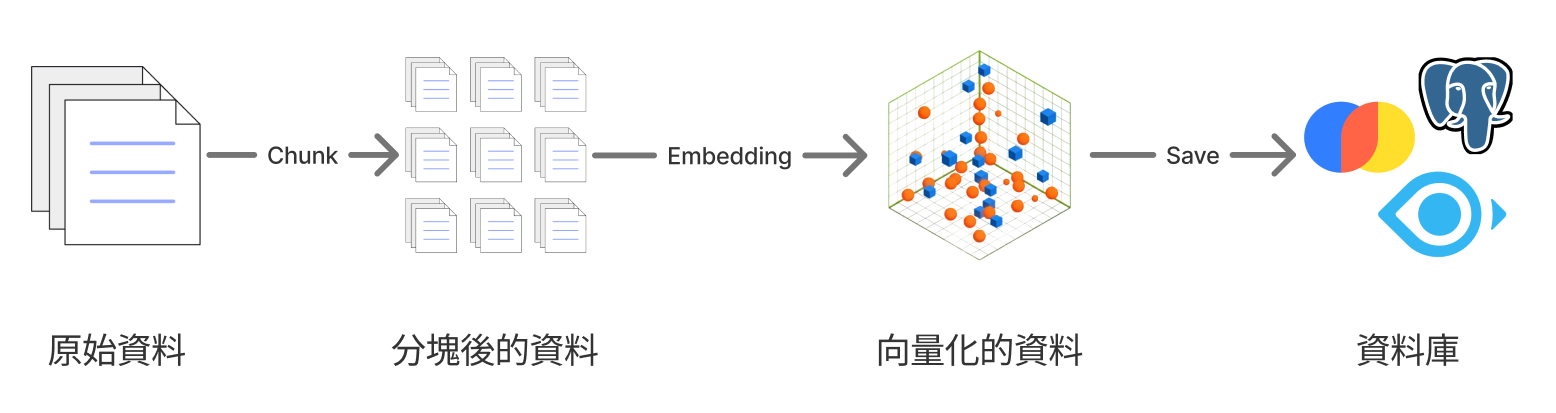
- Split documents into smaller chunks
- Convert text to vectors with an embedding model
- Store the vectors in a vector database
2. Retrieval and generation
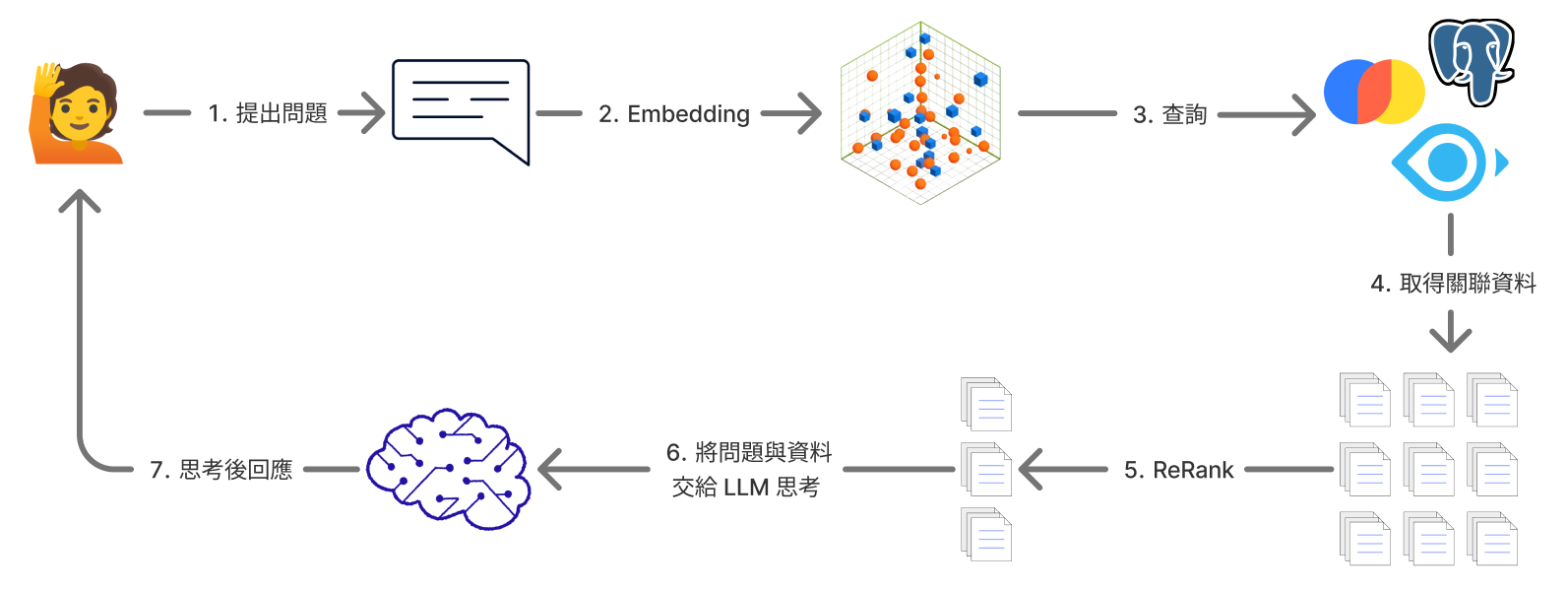
- Convert the user's question into a vector
- Search the vector database for the most similar chunks
- Return the best matches as context
- Combine that context with the original question
- Pass the prompt to an LLM to generate the answer
- Keep the response anchored to the retrieved material
Building a RAG system
Below is a minimal RAG setup using this stack:
- Python as the main language
- uv for dependency management
- ChromaDB as the vector store
- Google Gemini as the LLM
Main program
# main.py
import argparse
from typing import List

import chromadb
from google import genai
from dotenv import load_dotenv
from sentence_transformers import SentenceTransformer, CrossEncoder


def parse_arguments():
    """解析命令列參數"""
    parser = argparse.ArgumentParser(description='RAG 問答系統')
    parser.add_argument(
        'query',
        type=str,
        help='要查詢的問題'
    )
    parser.add_argument(
        '--doc-path',
        type=str,
        default='./story.txt',
        help='文檔路徑 (預設: ./story.txt)'
    )
    return parser.parse_args()


def split_into_chunks(doc_file: str) -> List[str]:
    """資料分塊"""
    try:
        with open(doc_file, 'r', encoding='utf-8') as file:
            content = file.read()
        return [chunk.strip() for chunk in content.split("\n\n") if chunk.strip()]
    except FileNotFoundError:
        print(f"錯誤:找不到檔案 {doc_file}")
        return []
    except Exception as e:
        print(f"讀取檔案時發生錯誤:{e}")
        return []


def embed_chunk(chunk: str, embedding_model: SentenceTransformer) -> List[float]:
    """將文本資料轉換為嵌入向量"""
    embedding = embedding_model.encode(chunk, normalize_embeddings=True)
    return embedding.tolist()


def save_embeddings(chunks: List[str], embeddings: List[List[float]], collection) -> None:
    """將嵌入向量保存到資料庫"""
    for i, (chunk, embedding) in enumerate(zip(chunks, embeddings)):
        collection.add(
            documents=[chunk],
            embeddings=[embedding],
            ids=[str(i)]
        )


def retrieve(query: str, top_k: int, collection, embedding_model: SentenceTransformer) -> List[str]:
    """檢索(搜尋)相關文檔資料"""
    query_embedding = embed_chunk(query, embedding_model)
    results = collection.query(
        query_embeddings=[query_embedding],
        n_results=top_k
    )
    return results['documents'][0]


def rerank(query: str, retrieved_chunks: List[str], top_k: int) -> List[str]:
    """重新排序檢索結果"""
    cross_encoder = CrossEncoder('cross-encoder/mmarco-mMiniLMv2-L12-H384-v1')
    pairs = [(query, chunk) for chunk in retrieved_chunks]
    scores = cross_encoder.predict(pairs)

    scored_chunks = list(zip(retrieved_chunks, scores))
    scored_chunks.sort(key=lambda x: x[1], reverse=True)

    return [chunk for chunk, _ in scored_chunks][:top_k]


def generate(query: str, chunks: List[str], google_client) -> str:
    """使用 LLM 生成回答"""
    prompt = f"""你是一位知識助手,請根據使用者的問題和下列相關片段生成準確的回答。

用戶問題: {query}

相關片段:
{"\n\n".join(chunks)}

請基於上述內容作答,不要編造資訊。"""

    try:
        response = google_client.models.generate_content(
            model="gemini-2.5-flash",
            contents=prompt
        )
        return response.text
    except Exception as e:
        return f"生成回答時發生錯誤:{e}"


def main():
    """主要執行函數"""

    # 解析命令列參數
    args = parse_arguments()
    query = args.query
    doc_path = args.doc_path

    # 載入環境變數
    load_dotenv()

    # 初始化 Google Gemini 客戶端
    google_client = genai.Client()


    # 分割文檔
    chunks = split_into_chunks(doc_path)
    if not chunks:
        print("無法載入文檔,程式結束")
        return

    print(f"成功載入 {doc_path}, 內容已經切分成 {len(chunks)} 個分塊 ...")

    # 初始化嵌入模型
    embedding_model = SentenceTransformer("shibing624/text2vec-base-chinese")

    # 生成嵌入向量
    embeddings = [embed_chunk(chunk, embedding_model) for chunk in chunks]

    # 初始化 ChromaDB
    chromadb_client = chromadb.EphemeralClient()
    chromadb_collection = chromadb_client.get_or_create_collection(name="default")

    # 保存嵌入向量
    save_embeddings(chunks, embeddings, chromadb_collection)

    # 查詢和檢索
    retrieved_chunks = retrieve(query, 5, chromadb_collection, embedding_model)

    # 重新排序
    reranked_chunks = rerank(query, retrieved_chunks, 3)

    # 生成回答
    answer = generate(query, reranked_chunks, google_client)
    print(f"\n問題:\n{query}")
    print(f"\n回答:\n{answer}")


if __name__ == "__main__":
    main()
Sample data
Here is the sample story in story.txt. Swap in your own content when you test.
《失落的圖書館》

在遙遠的沙漠中,有一座被黃沙掩埋的古老城市。傳說中,這裡曾經是知識的聖地,收藏著一座「失落的圖書館」。

第一章:商旅的傳聞
幾個世紀以來,穿越沙漠的商旅偶爾會聽到老人們的低語:有人在風暴中看見半掩的石門;有人說過在夜晚的月光下,隱約能看見石柱的影子。雖然這些故事從未被證實,但它們像火焰一樣,燃起無數冒險家的好奇心。

第二章:年輕學者的啟程
亞倫是一位對古代文明充滿熱情的學者。他在一份破舊的手稿裡找到了一張模糊的地圖,上面標示著一條與傳說相符的路線。懷著期待與不安,他決定踏上尋找「失落圖書館」的旅程。

第三章:穿越沙漠
沙漠之行並不輕鬆。白天酷熱,夜晚寒冷,亞倫的水源逐漸減少。他曾兩度懷疑自己是不是陷入了幻覺:有一次,他看見遠方出現一列石柱;另一次,他在沙丘後聽到彷彿是書頁翻動的聲音。

第四章:石門的出現
終於,在連續七日的沙塵暴過後,風勢稍歇。亞倫在沙丘頂端,看到一道半掩的石門。門上刻著古老的符號,與他手稿裡的標記相符。那一刻,他幾乎無法相信自己的眼睛。

第五章:進入圖書館
石門背後是一條狹長的石階,通往地下深處。當亞倫點燃火把時,眼前出現了一排排高聳的書架,上面堆滿了塵封的卷軸與羊皮紙。空氣中瀰漫著歷史的氣息。

第六章:知識的代價
然而,圖書館並非單純的寶庫。亞倫發現,這裡的書籍帶有一種奇異的力量:有些內容能讓他獲得前所未有的洞察,但也有些文字會讓他陷入混亂與恐懼。他意識到,這不只是尋寶之旅,而是一場對心智與靈魂的考驗。

第七章:抉擇
在圖書館的最深處,有一本書靜靜地放在石桌上,書脊上刻著「始與終」三個字。亞倫知道,打開它可能會改變他的一生。他站在那裡,火光搖曳,呼吸急促,陷入漫長的猶豫。
After installing dependencies, run a query like this:
uv run python main.py "亞倫是誰?"Ways to improve a RAG system
This example is intentionally small, but it shows the full RAG loop. From here you can refine each stage:
1. Smarter chunking
- Semantic splits instead of fixed character counts
- Preserve paragraph and sentence boundaries
- Respect document structure (headings, lists, and so on)
2. Better retrieval
- Hybrid search (keywords plus vectors)
- Re-ranking retrieved chunks
- Query expansion or rewriting
3. Stronger embedding models
- Purpose-built embedding APIs (for example OpenAI embeddings)
- Multilingual support
- Domain-specific models
4. Answer quality
- More deliberate prompt design
- Fact-checking against sources
- Accurate citations back to retrieved chunks
Real-world use cases
RAG shows up in many products:
- Internal knowledge bases — help staff find company documents quickly
- Customer support — answer from product docs automatically
- Learning platforms — tutor students from course material
- Legal workflows — surface guidance from statutes and filings
- Developer assistants — search API references on demand
Summary
RAG pairs retrieval with generation so AI systems can give answers that are more specific, more current, and easier to trace back to source material.
If this helped you get a handle on RAG, feel free to share it.